The short answer
If you searched for a MetaMask, Phantom, Exodus, Ledger or Trezor support number, stop before you call anything. These companies do not run phone support, and several say so directly. Numbers that appear in search results, review sites or social media replies for them are fake, and they are a common way people lose their crypto.
Real support happens in each company's own help center or in-app chat. And no wallet company can recover a lost recovery phrase, because it never had it.
Official support channels, wallet by wallet
We checked each company's own help pages on September 24, 2026.
| Wallet | Type | Official help | Phone support | Can they recover your recovery phrase? |
|---|---|---|---|---|
| MetaMask | Self-custody app | support.metamask.io (chat) | No. MetaMask says it has no support phone number | No |
| Coinbase Wallet | Self-custody app | help.coinbase.com, wallet section | No wallet phone line listed | No. Coinbase never has access to it |
| Coinbase (exchange account) | Custodial account | help.coinbase.com | Yes. Official numbers are listed on Coinbase's compromised-account page | Not a recovery-phrase account |
| Trust Wallet | Self-custody app | help.trustwallet.com and in-app chatbot | None listed | No |
| Phantom | Self-custody app | In-app chat | No. Phantom says it has no support phone number | No |
| Exodus | Self-custody app | In-app chat, support@exodus.com | No. Exodus says it does not offer phone support | No |
| Ledger | Hardware wallet | support.ledger.com | Ledger says it never contacts users by phone | No |
| Trezor | Hardware wallet | trezor.io/support | Trezor says to hang up on anyone claiming to be Trezor on the phone | No |
| Binance Wallet | Wallet inside the Binance app | Binance support on binance.com | Binance says callers claiming to be Binance are scammers | No |
Support policies change. Reach a company by typing its address yourself or opening help from inside the app, not by clicking a number in a search result.
Why no one can recover your seed phrase
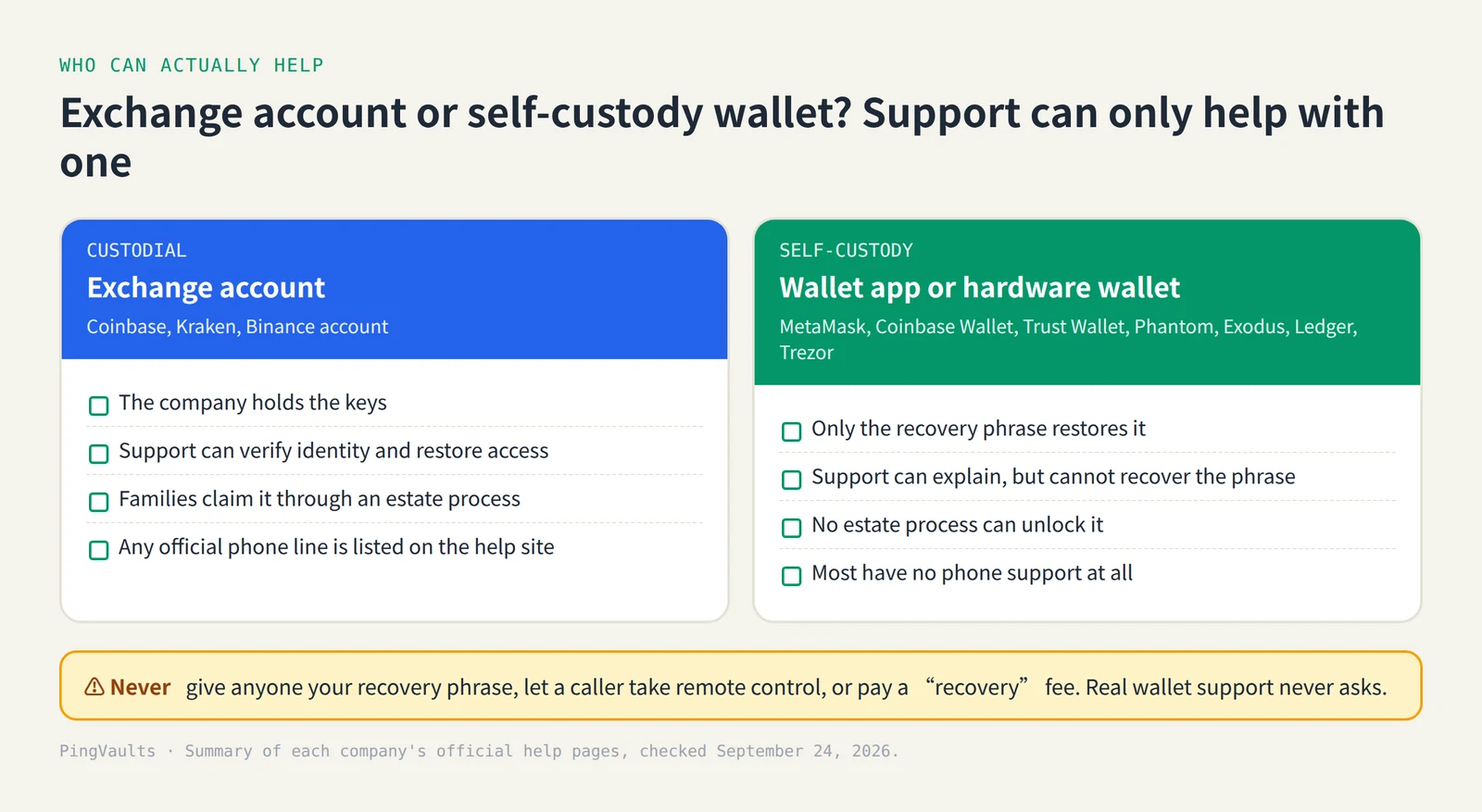
A self-custody wallet creates its keys on your own phone, computer or device. The 12 or 24 words of the recovery phrase are the only full copy. The company that makes the app never receives them, so there is nothing for its support team to look up or reset.
The companies are plain about this. MetaMask says that if you lose the phrase, no one can help you get your accounts back, "not MetaMask". Coinbase says it will never ask for or have access to a Coinbase Wallet recovery phrase. Trezor says that if you lose your wallet backup, it won't be able to help you recover it.
A few services offer a backup you choose before anything goes wrong: logging in to MetaMask with Google or Apple, the cloud backup behind a Binance keyless wallet, or Ledger Recover, a paid subscription. They only help if they were set up in advance. None of them lets a support agent recover a wallet after the fact.
Exchange account or wallet app? Check which one you have
The same brand can mean two different products, and only one of them has a support team that can restore access.
- Coinbase vs Coinbase Wallet. A Coinbase account is custodial: Coinbase holds the crypto, runs its own account support, and has a formal process for claiming a deceased person's account. Coinbase Wallet is a separate self-custody app that runs on its own recovery phrase.
- Binance vs Binance Wallet. A Binance exchange account has an inheritance process. Binance Wallet inside the app is either keyless or phrase-based, and Binance says it cannot restore it if the owner loses access.
- Ledger and Trezor. These are devices. Losing the device is fine if you have the recovery phrase. Losing the phrase and the device means the crypto is gone.
If you're not sure, look at how money went in. Bank transfers and monthly statements usually mean an exchange account. A 12–24 word backup or a hardware device means self-custody.
How fake support scams work
The US Consumer Financial Protection Bureau has noted that the lack of customer service options for many crypto platforms and wallets gives scammers an opening. They pose as support staff where people go looking for help:
- Phone numbers in search results, ads and review listings that answer as "MetaMask support" or "Ledger support"
- Replies and direct messages on X, Reddit, Discord or Telegram after you post about a problem
- "Validate", "sync" or "rectify" websites that ask you to type in your recovery phrase
- Remote-access requests, so a "technician" can take over your computer
- Recovery services that promise to get stolen crypto back for an upfront fee
The FTC warns that legitimate tech companies don't contact you by phone about problems, and that people who promise to recover lost money for a fee are running a second scam. The FBI has warned about fake law firms targeting crypto scam victims. Our scam red flags guide covers the patterns aimed at grieving families.
If you already shared your phrase or gave someone access
Act quickly and assume the wallet is compromised:
- Move what's left. On a device you trust, create a brand-new wallet with a new recovery phrase, then send any remaining funds to it. Don't reuse the old phrase.
- Cut off remote access. Uninstall any remote-control app the caller had you install, and change the passwords for your email and exchange accounts.
- Report it. In the US, file at ic3.gov and ReportFraud.ftc.gov. Tell the wallet company through its official help center.
- Expect a second approach. People offering to recover the stolen funds for a fee, including anyone claiming to be a lawyer or a government agency, are usually scammers too.
If you're handling a wallet after someone dies
Families are often told to "just call support". For a self-custody wallet, there's no support team that can open it, and calling a number from a search result puts the estate at risk.
What actually unlocks a self-custody wallet is the owner's recovery phrase, plus, for a hardware wallet, the device PIN and any extra passphrase. See our hardware wallet PIN, seed and passphrase guide for how these differ, and our 30-day family checklist for what to do first. Crypto held on an exchange is a different route: use the exchange's deceased-customer process.
Plan so your family never needs "support"
The best protection is a plan the people you trust can follow without calling anyone:
- List every wallet and exchange you use in a letter of instruction, without writing the recovery phrase itself in the letter.
- Store the recovery phrase somewhere durable and private, and test that it restores the wallet.
- Tell your family that no real wallet company will ever call them or ask for the phrase.
PingVaults can hold encrypted recovery instructions and a printable recovery card, so the people you choose know where to start, without any company holding the keys.
Common questions
Does MetaMask have a customer service phone number?
No. MetaMask says it has no support phone number and will never ask you to get on a call. Support runs through chat on support.metamask.io.
Is Coinbase Wallet support the same as Coinbase support?
Both are reached through the Coinbase Help Center, but they are different products. Coinbase can help with a Coinbase account. It cannot see or recover a Coinbase Wallet recovery phrase.
Can Ledger recover my 24 words?
No. Ledger Recover is an optional paid backup that has to be set up while you still have access. Without it, losing both the device and the 24 words means the crypto can't be recovered.
Someone from "wallet support" called me. What should I do?
Hang up. Wallet companies don't make support calls, and none will ask for your recovery phrase or remote access. If you gave anything away, follow the steps above straight away.